Mastering Abstract Circle Backgrounds in Design
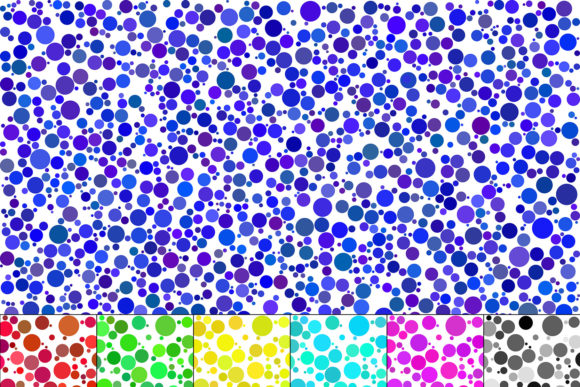
In the world of digital and print design, finding the right background asset can make or break a project. You need something that adds visual interest without overpowering your main content. The Abstract Background of Various Circles pack offers exactly that balance—a versatile collection of geometric designs that work across countless applications. With circles of different sizes in shades of gray, red, green, blue, yellow, and purple on white backgrounds, this set provides a modern, clean aesthetic that adapts to both personal and commercial projects.
Visual Character and Design Flexibility
What makes these abstract circle backgrounds stand out is their inherent versatility. The circles vary in size and overlap, creating depth and movement without becoming distracting. The color palette—ranging from muted grays to vibrant primary colors—means you can find an option that complements almost any brand or design scheme. The white background keeps things clean and ensures text remains readable when layered on top. This isn't just another set of generic textures; it's a thoughtful collection that understands the needs of modern typography and visual hierarchy.
From a design perspective, these backgrounds strike a balance between playful and professional. They work equally well for a tech startup's presentation deck, a creative agency's portfolio, or a small business's social media graphics. The geometric nature of circles brings a sense of completeness and harmony to layouts, while the varied sizes prevent monotony. When you're working on brand identity materials or web design, having assets that feel cohesive yet dynamic is invaluable.
Where These Backgrounds Excel
Let's talk practical applications. For logo design and branding projects, these circle patterns can serve as subtle backdrop elements that add texture without competing with your primary mark. Imagine a clean sans serif font paired with one of the softer gray or blue circle backgrounds—it creates depth while maintaining readability. In editorial design, whether you're laying out a magazine spread or a blog header, these patterns can section content visually and guide the reader's eye through your layout.
Digital applications are where these backgrounds truly shine. Use them for website hero sections, email newsletter headers, or social media graphics. The 16:9 aspect ratio (6667×3750 pixels) means they're already optimized for widescreen presentations and most digital platforms. For packaging design, especially for products targeting younger demographics or creative industries, these abstract circles add a contemporary touch that feels fresh and approachable. The included vector files (.ai CC and .eps 10) mean you can scale them infinitely without quality loss—essential for large-format printing or detailed product mockups.
Working With the Included Files
This pack includes 21 files total: 7 .ai CC files, 7 .eps 10 files, and 7 high-resolution .jpg files. The vector formats are your best friends when customizing colors, adjusting circle placements, or scaling to different dimensions. If you're comfortable with Adobe Illustrator, you can easily modify these backgrounds to match specific brand colors or create entirely new variations. The raster JPGs are ready to use immediately—perfect for quick projects or when you need a polished background without spending time on customization.
When incorporating these backgrounds into your work, consider your foreground content carefully. Bold, high-contrast typography works best against the more colorful variations, while delicate script fonts or handwritten fonts might get lost in busy patterns. Test different combinations before committing—overlay your headline text, check readability at various sizes, and ensure the background doesn't create visual noise that competes with your message. Remember, a great background supports your content; it doesn't fight for attention.
Choosing the Right Variation for Your Project
With seven different color options available, selecting the right one requires thinking about your project's goals and audience. The gray variations offer neutrality and sophistication—ideal for corporate presentations, professional portfolios, or minimalist web design. The red and yellow backgrounds bring energy and warmth, making them suitable for food-related brands, entertainment projects, or calls-to-action where you want to grab attention quickly. Blue and green tones convey trust and growth, perfect for healthcare, finance, or environmental organizations.
Purple backgrounds add a creative, slightly luxurious feel—think beauty brands, creative agencies, or artistic portfolios. When evaluating which variation fits your project, consider your existing brand palette and the emotional response you're trying to evoke. Don't be afraid to experiment with opacity adjustments or overlay effects if the full-strength background feels too dominant. Sometimes reducing the background to 30-50% opacity creates the perfect subtle texture that adds interest without distraction.
Practical Tips for Integration
Start by placing your chosen background and building your layout on top of it. Use strong contrast between your text and the background—dark text on lighter backgrounds or light text on darker circle clusters. Pay attention to where circles create natural focal points and align your key content elements accordingly. For social media graphics, these backgrounds can help your posts stand out in crowded feeds while maintaining a cohesive look across your content calendar.
Remember that these assets are design tools, not finished products. Their value lies in how you adapt and incorporate them into your specific creative vision. Whether you're a solo entrepreneur building a brand from scratch or a designer managing multiple client projects, having versatile background options like these saves time and elevates your work. The combination of vector and raster files gives you flexibility for both quick edits and detailed customization—exactly what you need in a fast-paced creative workflow.